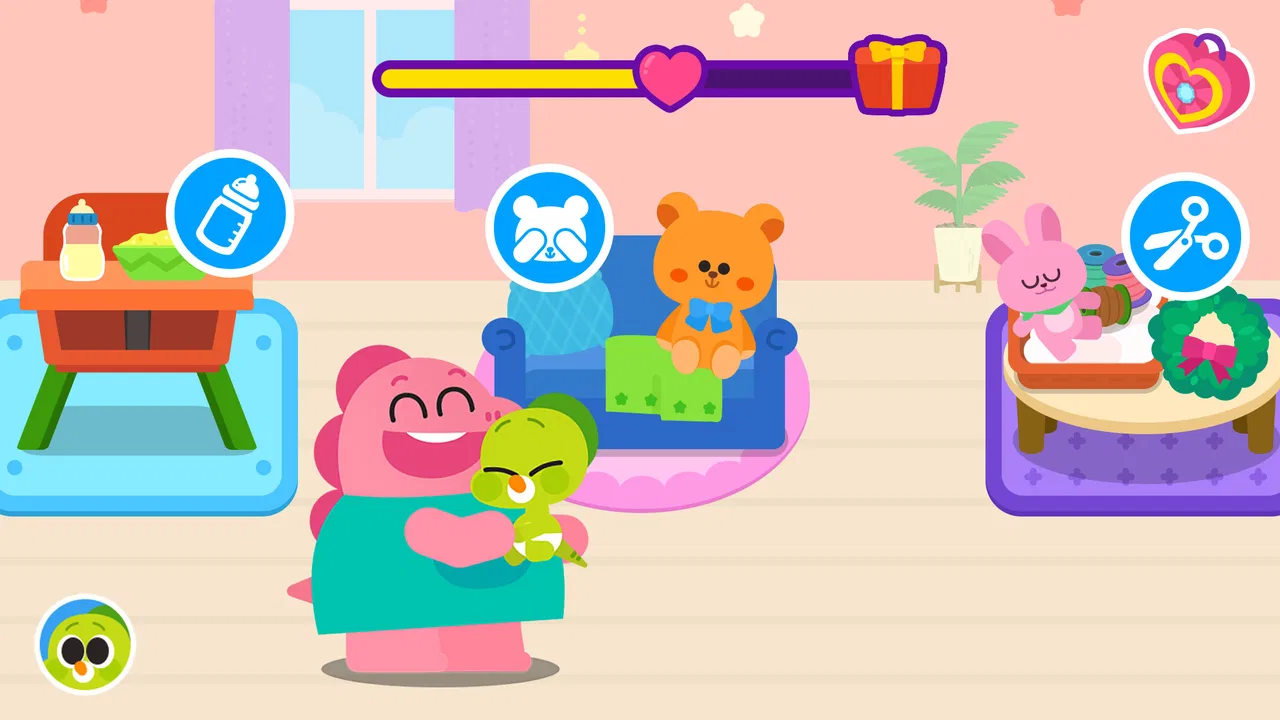
Cocobi Baby Care - Babysitter
- 3.7
- Rating
- 10.00M
- Installs
- Free
- Price

 Analysis by App-foxy
Some children’s games are built around speed, competition, or collecting rewards. Cocobi Baby Care - Babysitter takes a gentler route: it places the player in a caring role alongside dinosaur characters. I found that difference important because the game feels better suited to a short, supervised play session than to a child who wants a deep challenge or a long adventure.
Developed by KIGLE, this free educational game is aimed at everyone and is available for devices running Android 7.0 or later. Its central appeal is easy to understand: children look after baby dinosaur friends through simple care-oriented play. The presentation is approachable, but the real question for parents is not whether the idea sounds cute. It is whether the game is easy to start, comfortable to use, and worthwhile once the novelty fades.
My overall impression is positive, with an important qualification. This is best viewed as a compact digital babysitting activity, not as a complete early-learning curriculum or a substitute for open-ended play with a parent. It can fill a quiet few minutes, especially when an adult is nearby, but families should approach it with realistic expectations about repetition, purchases, and the limits of a simple children’s game.
You May Also Like

 Blood Strike: 2.5 Anniversary
Blood Strike’s Loadouts Turn Every Drop Into a Tactical Gamble
A close look at Blood Strike’s custom loadouts: how fast access to signature weapons reshapes its battle royale rhythm, rewards preparation, and narrows the gap between fights.

 Pandora - Music & Podcasts
Pandora’s Music Is Easy to Start, but Harder to Recover
Pandora’s strength is its low-effort path from a seed to a station. Its weak spot is how much confidence it asks you to place in connection, setup, and quiet recovery.

 8 Ball Pool
 Is Built on Rivalries, Rematches, and Routine
A close look at the rivalries, rematches, shared routines, and unanswered safety questions that turn a quick pool match into a persistent mobile community.

 Samsung Music
’s Quiet Strength Is Playing What You Already Own
Its reach comes less from spectacle than from dependable access to a personal library. That simplicity is both the app’s strongest retention engine and its ceiling.

 AccuWeather: Weather Radar
AccuWeather Review: A Quick, Clear Forecast for Everyday Decisions
For everyday plans, the best forecast is the one you can understand quickly. AccuWeather makes rain timing, radar, and local conditions easy to act on, with a few trade-offs.

 Hill Climb Racing
Why Hill Climb Racing Still Turns Crashes Into One More Run
A tiny car, a bumpy hill and one more upgrade: Hill Climb Racing keeps resurfacing because its simple chaos makes every near-miss feel personal.
More From Our News Desk



What the first play session feels like
The first useful test is whether a young player can understand the basic situation without a long explanation. Cocobi Baby Care succeeds here because the dinosaur-care theme gives the activity an immediate purpose. A child does not need to understand a complicated story or memorize a set of rules before beginning. The characters provide a friendly reason to interact, and the care setting makes the game feel less abstract than many tap-based children’s titles.
In my experience, the likely sticking point is not the idea itself but the transition from opening the game to knowing what to do next. Young children often tap everything on screen, move away from the intended activity, or hand the device to an adult when an icon is unfamiliar. That is normal rather than a sign that the game is broken. A short first session with a parent can make the controls feel much more obvious.
Another place users can get stuck is expecting the game to behave like a traditional babysitting simulation. It is not the kind of title I would choose for detailed planning, realistic routines, or complex decision-making. The appeal comes from accessible interactions with dinosaur friends and the satisfaction of completing small care moments. That makes it suitable for younger players, but older children may quickly look for more variety.
The educational label also needs a little context. The game encourages attention, following simple sequences, and thinking about care, but I would not use it as the main tool for teaching reading, mathematics, science, or language. Its learning value is informal and activity-based. It works best as a playful prompt for talking about what a baby needs, what happens next, and why gentle care matters.
That distinction helps answer a common parent concern: is this a learning app or just entertainment? I would describe it as entertainment with a light educational purpose. If you want structured lessons, progress tracking, or a clearly defined academic skill, another educational app will probably be a better match. If you want a friendly game that gives a child a simple caring role, this one makes more sense.
Where the setup can cause unnecessary frustration
Before handing over the device, I recommend checking the operating system and making sure the game has finished installing properly. The current version is 1.0.28, and the stated minimum is Android 7.0. That matters most on an older family tablet, where an installation problem may be mistaken for a gameplay issue. If the app will not open, checking compatibility and restarting the device is a more useful first step than repeatedly tapping the icon.
A second practical check is storage. Children’s games are often installed on shared devices that already contain photos, videos, and several other apps. When there is very little free space, installation or updating can behave unpredictably. I would clear enough room before beginning, then reopen the store and try again if the first attempt did not complete.
It is also worth deciding who will supervise purchases. The game is free to download, while in-app items cost $1.99 each. That is not a reason to avoid it, but it is a reason to configure the device responsibly before a child starts playing. A child may understand that something is attractive without understanding that tapping it can involve real money. I would never leave that decision to the game session itself.
The age label is Everyone, which fits the friendly concept and broad accessibility. Still, an age rating does not tell you whether the pace, visual style, or amount of repetition will suit your particular child. Some children enjoy repeating familiar care activities; others become restless unless every session introduces something new. Watching the first few minutes will tell you more than the rating alone.
For a smoother start, I use a simple routine: install the game, open it once without the child present, check that the main screen responds normally, and then play together briefly. This catches basic device problems and also lets the adult explain the purpose in plain language. Instead of saying “tap everything,” I would say, “Let’s see what the dinosaur needs first.” That small change encourages observation rather than random tapping.
Recovering when a child loses the flow
When a young player stops progressing, the best recovery is usually calm and local. I would first ask what the dinosaur is trying to do, then look for the most obvious visual response rather than taking over the whole device. Children learn more when they are allowed to make the next choice themselves. If the screen seems unresponsive, close other apps, return to the game, and try again after a short pause.
Restarting the app is a reasonable general fix for a temporary freeze, but I would avoid deleting and reinstalling immediately. Reinstallation can create fresh setup work and may not solve a problem caused by the device, a connection, or an interrupted update. A full device restart is also worth trying when several apps are acting slowly, because that points away from this particular game.
Another useful recovery method is to shorten the session. A tired child may appear to have difficulty with the controls when the real problem is attention. Five focused minutes can be more successful than insisting on a long play period. I found that the care theme works particularly well as a transition activity: a child can play briefly before lunch, after returning home, or while an adult finishes a small nearby task.
Parents should also distinguish between a blocked activity and a child who has simply lost interest. If the game opens, responds to touches, and the dinosaur interactions work, but the child keeps leaving the screen, troubleshooting will not create motivation. In that situation, I would stop rather than turning a gentle game into a battle. The title is meant to invite care, not demand endurance.
When two children share a device, turn-taking can become the real source of friction. The game’s simple format may look ideal for sharing, but young children can still disagree about who gets to choose the next action. I would use short, clearly announced turns and let one child explain the situation while the other taps. That turns a possible argument into a small cooperative exercise, although it requires adult guidance.
When the problem is probably outside the game
Not every failed session is caused by the application. A weak internet connection can affect downloading, updating, or any part of the initial setup that depends on the device being connected. If other store downloads are also failing, I would investigate the connection first. If only this game has trouble, checking compatibility, available storage, and restarting the app becomes more relevant.
Device performance can also change the experience. An older phone with many background apps may respond slowly, and a child may interpret delayed feedback as a broken game. Closing unused apps and giving the device a moment to settle can help. I would also avoid judging the game while the device is overheating or running on very low battery, since those conditions can affect general responsiveness.
Sound is another easy source of confusion. If the game appears to work but feels strangely quiet, check the device’s media volume and mute settings before assuming the app has failed. Children often rely on sound as confirmation that an action worked, so a silent session can seem less understandable even when the touch controls are functioning.
Notifications and other apps can interrupt a child’s attention. A message appearing over the game may cause accidental taps or make the child think the session has ended. For supervised play, I prefer preparing the device first: close unrelated apps, silence unnecessary alerts, and keep the screen at a comfortable brightness. These are general device habits, but they make a noticeable difference with a young player.
There is also a human factor that troubleshooting cannot fix. Some children want a game with vehicles, puzzles, building, or fast movement. A dinosaur babysitting theme may simply not match their interests. I would not push this title on a child who repeatedly asks for a different kind of play. The game’s strength is its calm care scenario, and that is also the reason it will not suit everyone.
How I would use it in everyday family life
A realistic use case is a short supervised break while a parent prepares a snack. I would start the game with the child, let the child identify what the dinosaur needs, and ask one simple question about the action. After the activity, we could connect the game to real life by talking about how babies need attention, patience, and gentle handling. The value comes partly from that conversation, not only from the taps on the screen.
It can also work as a low-pressure introduction to digital routines. A parent might set a clear beginning and ending: play for a short while, complete one care activity, then put the device away. Because the game is free to download and carries an Everyone rating, it is easy to try without committing to a paid title. The important part is keeping the device routine more predictable than the in-game rewards.
I would not use it as an electronic babysitter for an extended period. Even a well-designed children’s game benefits from occasional adult involvement, especially when the child is still learning how to interpret instructions and make choices. The dinosaur characters can start a conversation, but they should not replace real interaction, pretend play, books, or hands-on activities.
For preschool-age children who enjoy animals and nurturing play, the game has a clear advantage over many educational alternatives that focus almost entirely on letters, numbers, or matching. It gives the child a role rather than presenting only exercises. On the other hand, a structured learning app is preferable when a parent wants measurable practice in a particular school skill. A creative sandbox is preferable when the child wants freedom to invent rather than follow care prompts.
The game’s popularity gives some useful context without settling the decision. It has passed ten million installs and holds an average rating of 4.1 from around 6.4 thousand ratings. Those figures suggest that the concept has reached a broad audience, but they do not guarantee a perfect fit for every child. I would treat them as reassurance that the game is established, then make the final choice based on the child’s temperament and the family’s expectations.
What the free model means in practice
The free entry point is convenient, particularly for parents who want to test the tone before spending anything. I like being able to evaluate whether a child understands the activities and enjoys the dinosaur characters without buying the game first. That makes the decision more flexible than choosing a paid title sight unseen.
At the same time, the presence of $1.99 in-app items means the adult should remain in control of the purchasing process. I would explain to a child that some things inside a free game may not be available without permission, then use the device’s purchase safeguards. This is not unique to this title, but it is especially important when the intended audience is young and the interactions are designed to feel inviting.
My practical advice is to judge the free experience on its own. If the child enjoys the core care activities, the game has already done its job as a short educational pastime. Do not assume that buying an item will solve boredom or create a deeper learning experience. Purchases may add convenience or appeal, but they cannot turn a simple babysitting game into a comprehensive educational program.
Who should choose it, and who should skip it
I would recommend Cocobi Baby Care - Babysitter to parents looking for a gentle dinosaur-themed game for a young child, especially when the child likes pretend care more than competition. It is also a reasonable choice for a shared family tablet where an adult can help with the first session, manage purchases, and decide when play should end.
I would be more cautious if your main goal is academic instruction. The game’s educational value is tied to simple care-based interaction, not a full lesson plan. I would also skip it for a child who needs constant novelty, complex puzzles, or a strong sense of progression. In those cases, a more structured learning app or a richer game category will likely hold attention better.
Families with very old devices should perform the compatibility check before promising the game to a child. Android 7.0 is the minimum listed system, and the version installed on the device matters more than the age of the phone’s brand. If the device meets that requirement but still struggles, general maintenance steps such as freeing storage and restarting may be enough to improve the session.
One final trade-off is supervision. The game is easy to understand in broad terms, but “easy” does not mean every child will navigate it independently. A parent may need to interpret the next step, recover the flow after an interruption, or stop an accidental purchase. For me, that is acceptable because the game works well as shared screen time. It is less attractive if the goal is completely hands-off use.
My practical verdict after using it
KIGLE has made a focused children’s game with a clear emotional hook: caring for dinosaur friends feels warmer and more memorable than tapping through disconnected exercises. I appreciate that the concept can lead naturally to conversations about patience and responsibility, while still remaining approachable for a young player.
Its limitations are equally clear. The experience is not a replacement for formal learning, it may feel repetitive to older children, and the free model requires sensible purchase controls. Setup and performance problems should be checked at the device level before blaming the game, and a child who dislikes nurturing play is unlikely to become engaged simply because the characters are dinosaurs.
For the right household, I think it is worth trying. Start with a short shared session, check that the device is compatible and responsive, keep purchases under adult control, and use the activities as a springboard for real conversation. With those expectations, Cocobi Baby Care - Babysitter is a pleasant educational game for brief, supervised play rather than an all-purpose solution for learning or childcare.
FAQs for Cocobi Baby Care - Babysitter
01What is Cocobi Baby Care - Babysitter about?
Cocobi Baby Care - Babysitter is an interactive app designed to simulate the experience of taking care of a baby. Users can engage in various activities such as feeding, bathing, and playing with the virtual baby. It provides a fun and educational way to learn about childcare responsibilities, making it ideal for young users.
02Is Cocobi Baby Care - Babysitter suitable for all age groups?
The app is primarily designed for children and young users who are interested in learning about childcare. However, it can also be enjoyable for anyone who likes simulation games. Parents might find it useful as a learning tool for their kids, but it's always good to check the content to ensure it aligns with personal values.
03Does Cocobi Baby Care - Babysitter require an internet connection?
Cocobi Baby Care - Babysitter can be played offline, making it convenient for use without an active internet connection. However, some features may require internet access, such as downloading additional content or updates. It's recommended to connect occasionally to ensure the app is updated with the latest features and improvements.
04Are there any in-app purchases in Cocobi Baby Care - Babysitter?
Yes, Cocobi Baby Care - Babysitter offers in-app purchases. These might include additional items, features, or content packs to enhance the gameplay experience. It's important for parents to monitor and manage in-app purchases if children are using the app, to avoid accidental spending.
05How can I ensure my child’s safety while using Cocobi Baby Care - Babysitter?
To ensure your child’s safety while using Cocobi Baby Care - Babysitter, it's advisable to review the app's privacy settings and parental controls. Familiarize yourself with any data collection practices and ensure that no personal information is being shared. Supervising your child's play and discussing in-app purchases can also help maintain a safe experience.
Pros
- User-friendly interface for all ages.
- Engaging mini-games for kids.
- Educational content on baby care.
- Ad-free experience enhances focus.
- Offline play supported.
Cons
- Limited customization options.
- Some tasks become repetitive.
- Requires large storage space.
- In-app purchases can add up.
- Lacks multi-language support.

Cocobi Baby Care - Babysitter
Gallery